State Connect: Traffic Control1.208
Publisher Description


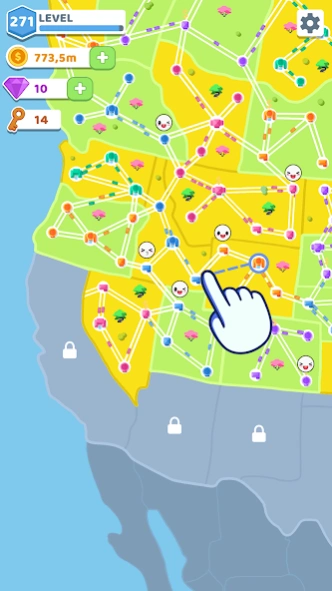

Manage car traffic by building roads and cities in this highway simulator game
Build motorways between cities for cars to drive, solve traffic problems and earn more points to carry out even more transportation. Play State Connect to bridge all the new states territory together.
This connection game is very easy to control and incredibly enjoyable to play. A huge number of different options for the road construction of transit systems. To build a highway - just slide your finger from one point to another and the movement will begin! Don't forget to upgrade your cities to create even more freeways and take over the world! State Connect will make you feel like a real road manager and transport planner who can conquer world domination!
Game features:
- Strategic traffic and route planning simulation
- Satisfying idle map with many cars moving at once
- Addictive gameplay
- Dozens of levels
- Smooth animations and lively colors
- Simple and intuitive controls
- Exciting gaming session
More than a hundred cities and even more highways. Plan, construct and create a road system in the city that this games world has never seen! Connect every state territory across the map and become a transport tycoon! Download State Connect and play this idle management simulation game for free.
About State Connect: Traffic Control
The company that develops State Connect: Traffic Control is CASUAL AZUR GAMES. The latest version released by its developer is 1.208.
To install State Connect: Traffic Control on your Android device, just click the green Continue To App button above to start the installation process. The app is listed on our website since 2026-10-09 and was downloaded 28 times. We have already checked if the download link is safe, however for your own protection we recommend that you scan the downloaded app with your antivirus. Your antivirus may detect the State Connect: Traffic Control as malware as malware if the download link to com.TwinCrab.Motorpolia is broken.
How to install State Connect: Traffic Control on your Android device:
- Click on the Continue To App button on our website. This will redirect you to Google Play.
- Once the State Connect: Traffic Control is shown in the Google Play listing of your Android device, you can start its download and installation. Tap on the Install button located below the search bar and to the right of the app icon.
- A pop-up window with the permissions required by State Connect: Traffic Control will be shown. Click on Accept to continue the process.
- State Connect: Traffic Control will be downloaded onto your device, displaying a progress. Once the download completes, the installation will start and you'll get a notification after the installation is finished.
Program Details
System requirements
Download information
Pricing
Version History
version 1.208
posted on 2026-10-09
UX improvement
version 1.206
posted on 2026-09-24
version 1.136
posted on 2025-03-21
UX improvements
version 1.36
posted on 2022-05-10
Improved perfomance
version 1.34
posted on 2022-04-21
Imrpoved perfomance
version 1.33
posted on 2022-04-11
Bug fixes
version 1.27
posted on 2022-03-31
Added music and sound effects
version 1.17
posted on 2022-01-04
UX improvements, added NoAds purchase, bug fixes
version 1.16
posted on 2021-12-08
Fixed gdpr window
